
Crop PDF margins visually
To crop a PDF, upload it to Toolzzz Crop PDF, drag the crop frame over the area you want to keep (or type the margins in millimetres, or press Auto-trim white margins), choose whether to apply it to all pages or just one, and press Crop and download PDF. The PDF is processed in your browser and never uploaded.
- Auto-trim white space
- Exact margins in mm
- 100% free, no sign-up
- Files never uploaded
- No file size limit
- Windows, Mac, iPhone & Android
- No watermark
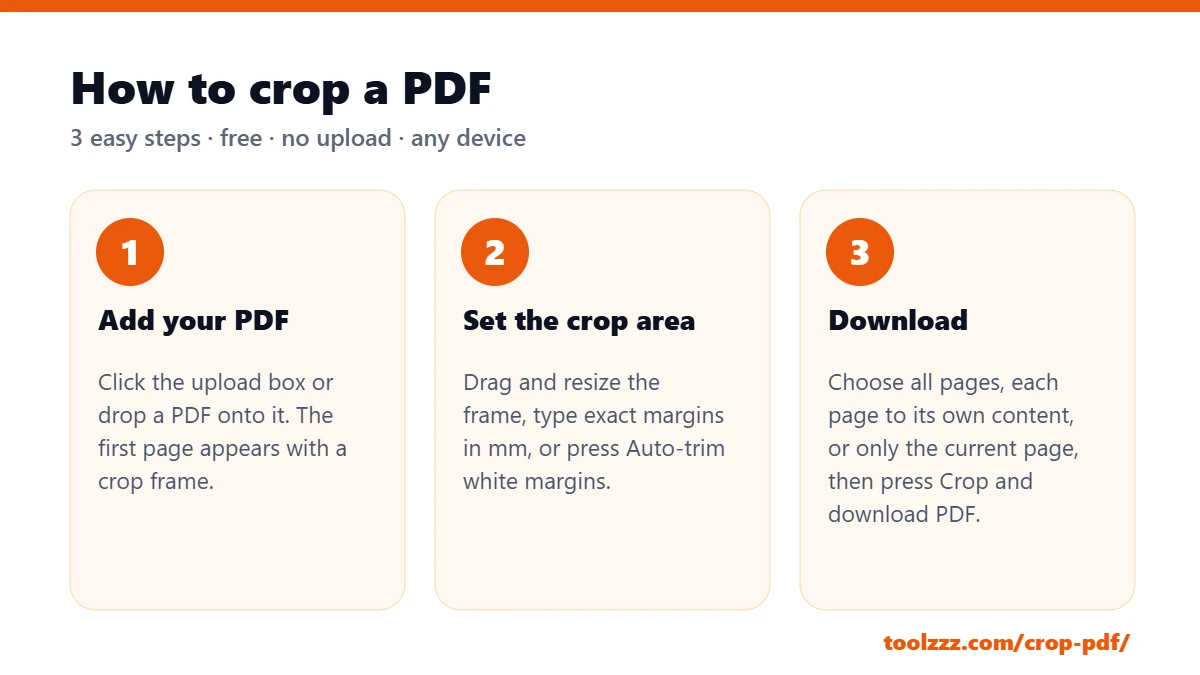
How to crop a PDF
Remove wide white margins, scanner borders or unwanted edges so pages are easier to read on screens and phones.
Add your PDF
Click the upload box or drop a PDF onto it. The first page appears with a crop frame.
Set the crop area
Drag and resize the frame, type exact margins in mm, or press Auto-trim white margins.
Download
Choose all pages, each page to its own content, or only the current page, then press Crop and download PDF.
Watch: crop and trim PDF margins
Popular reasons to crop a PDF
Read on phones and e-readers
Cutting wide margins makes text bigger on small screens, so you zoom less.
Remove scanner borders
Trim the dark edges and shadows that scanners and phone apps leave around pages.
Cut a part of a page
Keep just a chart, receipt or label from a full page.
Fix different page sizes
Crop pages to the same area so a combined document looks consistent.
Prepare academic papers
Trim margins of articles and slides before printing several on one sheet.
Clean slides and exports
Remove white space around exported slides, plans and diagrams.
Important: cropping hides, it does not delete
PDF cropping works by setting the visible area of each page (the crop box). Every PDF reader shows only that area, and printing follows it too. The content outside the frame is still inside the file, though, and can be shown again with professional PDF editors.
That makes cropping safe and lossless: your text stays sharp and selectable. But it also means cropping is not a way to remove private information. To remove names, numbers or other details for good, use Redact PDF.
Which "Apply to" option should I pick?
- All pages (same frame): best for documents where every page has the same layout, such as a book or a report.
- Trim each page to its own content: best for scans or mixed documents where the content sits in different places on each page.
- Only the current page: when only one page, such as a wide table or a scanned receipt, needs cropping.
How to crop a PDF on Windows, Mac, iPhone and Android
No app to install. The tool works in any modern browser, so the steps are almost the same everywhere.
On Windows
- Open toolzzz.com/crop-pdf/ in Chrome, Edge or Firefox.
- Drag your PDF from File Explorer onto the upload box.
- Drag the crop frame or press Auto-trim white margins, then press Crop and download PDF.
- The new PDF is saved to your Downloads folder.
On Mac
- Open the page in Safari, Chrome or Firefox.
- Drag the PDF from Finder onto the upload box.
- Drag the crop frame or press Auto-trim white margins, then press Crop and download PDF.
- Find the new file in Downloads.
On iPhone and iPad
- Open the page in Safari.
- Tap the upload box, then Browse to pick the PDF from the Files app.
- Drag the crop frame or press Auto-trim white margins, then press Crop and download PDF.
- Tap Download and find the file in Files → Downloads.
On Android
- Open the page in Chrome.
- Tap the upload box and pick the PDF from Files or Downloads.
- Drag the crop frame or press Auto-trim white margins, then press Crop and download PDF.
- The new PDF is saved in your Downloads folder.
Toolzzz vs. typical online PDF tools
| Feature | Toolzzz Crop PDF | Typical online PDF tools |
|---|---|---|
| Your file is uploaded to a server | Never. It is processed in your browser | Usually |
| File size and page limits | None, only your device memory | Often 10 to 100 MB, or a few files per day |
| Watermark on the result | Never | Sometimes on free plans |
| Account or e-mail needed | No | Often for larger files |
| Auto-trim white margins | Yes, for one page or each page separately | Usually manual only |
| Exact margins in millimetres | Yes | Sometimes |
| Price | Free | Free with limits, or a paid plan |
"Typical" describes common limits of free online PDF services. Plans and limits differ between sites.
A visual PDF cropper that keeps quality
Visual crop frame
See exactly what will remain before you download.
Auto-trim
Finds the content and removes white space for you.
Precise margins
Type margins in mm when you need exact measurements.
Flexible scope
Crop all pages, each page separately, or only one page.
Lossless
Text stays vector and selectable. Nothing is re-printed as an image.
Private by design
Your PDF is cropped in your browser. Nothing is uploaded.
Key terms explained
- Crop box
- The area of a PDF page that viewers display and printers print. Changing it hides everything outside.
- Media box
- The full physical size of a PDF page. Cropping does not change it.
- Margin
- The empty space between the content and the edge of the page.
Frequently asked questions
How do I crop a PDF?
Upload the PDF, drag the crop frame over the part you want to keep and press Crop and download PDF.
How do I remove white margins from a PDF?
Press Auto-trim white margins. For scans where each page differs, choose Trim each page to its own content.
Can I crop just one page of a PDF?
Yes. Go to that page with Prev / Next, set the frame and choose Only the current page.
Can I set exact margins?
Yes. Type the margins to remove in millimetres under Top, Bottom, Left and Right.
Does cropping delete the hidden content?
No. Cropping hides the area outside the frame. To remove sensitive content for good, use Redact PDF.
Will cropping reduce the quality?
No. Only the visible area changes. Text and images stay exactly as they were.
Can I crop a PDF on my phone?
Yes. Drag the frame with your finger, or type the margins, then download.
Is my PDF uploaded?
No. Cropping happens in your browser, on your own device.