
Compress images without losing quality
To compress an image, drop one or more JPG, PNG or WebP files into Toolzzz Compress Image, choose Balanced (or set the quality slider), and press Download all. A before/after slider shows the difference, and most photos become 60–90% smaller with no visible change. Images are compressed in your browser and never uploaded.
- Batch + ZIP download
- Before/after slider
- 100% free, no sign-up
- Files never uploaded
- No file size limit
- Windows, Mac, iPhone & Android
- No watermark
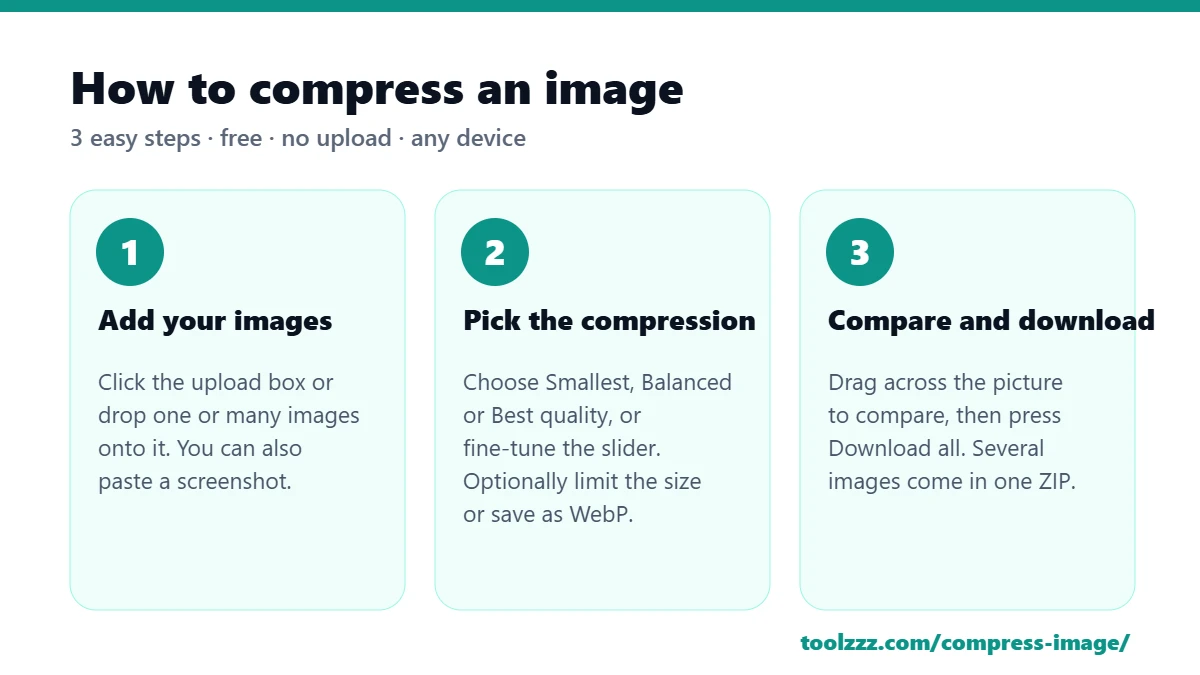
How to compress an image
Smaller images load faster, fit email and upload limits, and save space on your phone.
Add your images
Click the upload box or drop one or many images onto it. You can also paste a screenshot.
Pick the compression
Choose Smallest, Balanced or Best quality, or fine-tune the slider. Optionally limit the size or save as WebP.
Compare and download
Drag across the picture to compare, then press Download all. Several images come in one ZIP.
Watch: compress images without losing quality
Popular reasons to compress images
Faster websites
Lighter images improve page speed and Core Web Vitals, which helps SEO and keeps visitors.
Email attachments
Send more photos in one email without hitting 10–25 MB limits.
WhatsApp and social media
Upload faster on slow connections and save mobile data.
Online forms and portals
Fit job, university and government upload limits.
Free up storage
Shrink photo folders on your phone, laptop or cloud drive.
Online shops
Product photos that load fast convert better on mobile.
Which quality setting should I use?
| Setting | Typical saving | Best for |
|---|---|---|
| Best quality (90%) | 30–60% | Portfolios, printing, product close-ups |
| Balanced (75%) | 60–80% | Websites, blogs, email, most photos |
| Smallest (55%) | 75–90% | Upload limits, chat apps, thumbnails |
JPG, PNG or WebP?
JPG is best for photos. PNG is best for screenshots, logos and images with transparency: we reduce its colours smartly, which keeps edges sharp. WebP is a modern format that is usually 25–35% smaller than JPG at the same quality and works in all current browsers. For an exact size limit, use our Compress to 100 KB or 50 KB tools.
Your photos are also cleaned
Compressed images are saved without hidden EXIF data such as GPS location and camera serial numbers, which is good for privacy when you share photos online.
How to compress images on Windows, Mac, iPhone and Android
No app to install. The tool works in any modern browser, so the steps are almost the same everywhere.
On Windows
- Open toolzzz.com/compress-image/ in Chrome, Edge or Firefox.
- Drag your images from File Explorer onto the upload box.
- Choose the compression level, compare with the slider, then press Download all.
- The new file is saved to your Downloads folder.
On Mac
- Open the page in Safari, Chrome or Firefox.
- Drag the images from Finder onto the upload box.
- Choose the compression level, compare with the slider, then press Download all.
- Find the new file in Downloads.
On iPhone and iPad
- Open the page in Safari.
- Tap the upload box, then Browse to pick the images from Files or Photos.
- Choose the compression level, compare with the slider, then press Download all.
- Tap Download and find the file in Files → Downloads.
On Android
- Open the page in Chrome.
- Tap the upload box and pick the images from Files, Gallery or Downloads.
- Choose the compression level, compare with the slider, then press Download all.
- The new file is saved in your Downloads folder.
Toolzzz vs. typical online compressors
| Feature | Toolzzz Compress Image | Typical online compressors |
|---|---|---|
| Your file is uploaded to a server | Never. It is processed in your browser | Usually |
| File size and page limits | None, only your device memory | Often 10 to 100 MB, or a few files per day |
| Watermark on the result | Never | Sometimes on free plans |
| Account or e-mail needed | No | Often for larger files |
| Number of images at once | Unlimited, plus ZIP download | Often 20 images or 5 MB each |
| Before/after comparison slider | Yes | Sometimes |
| Removes GPS / EXIF data | Yes, automatically | Varies |
| Price | Free | Free with limits, or a paid plan |
"Typical" describes common limits of free online services. Plans and limits differ between sites.
An image compressor that keeps your photos private
Never uploaded
Photos are compressed on your own device, so private pictures stay private.
Batch compression
Drop dozens of images at once and download them in a single ZIP.
Before/after slider
Compare the original and compressed version side by side.
JPG, PNG and WebP
Smart PNG colour reduction keeps transparency and sharp edges.
Full control
Quality presets, a fine slider, size limits and format choice.
Free, no limits
No sign-up, no daily limit and no watermark.
Tips for the smallest images
- Resize first. Most phone photos are 4000 px wide. For websites and email, 1920 px or less is plenty, so pick it under Max width / height.
- Use WebP for websites. It is usually a third smaller than JPG at the same quality.
- Avoid compressing twice. Every JPG save loses a little quality. Keep your original and compress a fresh copy each time.
Key terms explained
- Lossy compression
- Removing image detail the eye barely notices to make files much smaller, as used by JPG and WebP.
- Lossless compression
- Making files smaller without changing any pixel. Savings are smaller than with lossy compression.
- EXIF data
- Hidden information in photos, such as camera model, date and GPS location.
Frequently asked questions
How do I compress an image without losing quality?
Use Balanced or Best quality. At 75–90% quality the difference is almost impossible to see, while the file is usually 50–80% smaller. Use the slider on the picture to check.
How do I reduce the size of a photo in KB?
Drop the photo here and choose Smallest, or limit the size to 1920 or 1280 px. For an exact limit, use Compress Image to 100KB.
Can I compress many images at once?
Yes. Add as many as you like. Press Download all to get them in one ZIP file.
Does compressing a PNG keep the transparent background?
Yes. PNGs are compressed by reducing colours, which keeps transparency.
What is the best format for small images?
WebP gives the smallest files for websites. JPG is the most compatible for photos.
Why is my image not getting smaller?
It may already be well compressed. In that case we keep the original and show Already small. Try a lower quality or a smaller size.
Can I compress images on my phone?
Yes. Open this page on Android or iPhone, choose photos from your gallery and download the compressed copies.
Are my images uploaded?
No. Everything happens in your browser. Your images never leave your device.