
Sign a PDF online in under a minute
To sign a PDF online, upload it to Toolzzz Sign PDF, draw your signature with a mouse or finger (or type your name, or upload a photo of your signature), press + Signature, drag it to the right spot and press Sign and download PDF. You can add the date and sign several pages. The document stays on your device and is never uploaded.
- Draw, type or upload
- Add date
- 100% free, no sign-up
- Files never uploaded
- No file size limit
- Windows, Mac, iPhone & Android
- No watermark
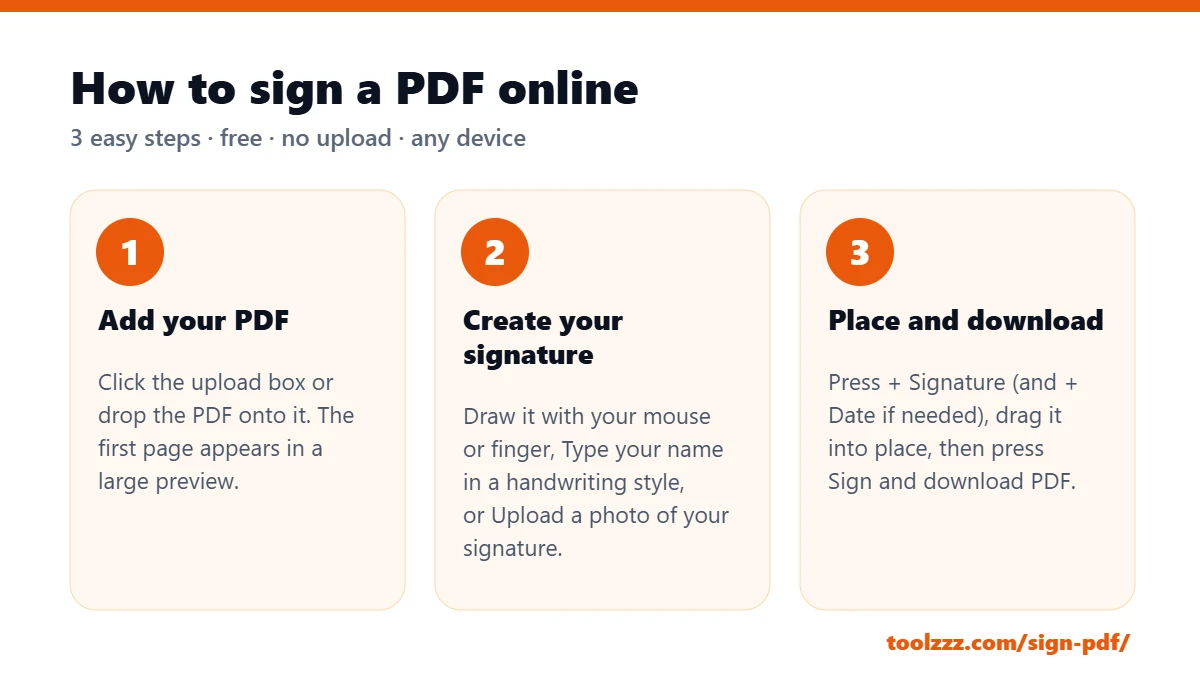
How to sign a PDF online
Sign forms, contracts and letters without printing, scanning or installing anything.
Add your PDF
Click the upload box or drop the PDF onto it. The first page appears in a large preview.
Create your signature
Draw it with your mouse or finger, Type your name in a handwriting style, or Upload a photo of your signature.
Place and download
Press + Signature (and + Date if needed), drag it into place, then press Sign and download PDF.
Watch: sign a PDF online without printing
Popular documents people sign online
Contracts and agreements
Sign rental agreements, freelance contracts and NDAs, then send them straight back.
Forms and applications
Sign school forms, job applications and visa or bank forms without a printer.
Letters and approvals
Add your signature to letters, purchase orders and approval sheets.
Sign on your phone
Draw your signature with your finger on Android or iPhone, wherever you are.
Several signatures
Sign every page, or add initials and signatures in several places.
Private documents
Sign IDs, medical forms and financial papers without uploading them anywhere.
Electronic vs. digital signatures
The signature you add here is an electronic signature: an image of your handwritten signature placed on the page. For most everyday documents, such as forms, letters, quotes and many contracts, this is widely accepted, and in many countries electronic signatures are legally valid for most agreements.
A certificate-based digital signature is different. It uses a digital ID issued by a trusted provider and locks the file so any later change can be detected. Some government, banking and court documents require this type. If you are unsure which one you need, ask the person or organisation that sent you the document.
Tips for a good-looking signature
- Draw slowly and large. The signature is trimmed and scaled automatically, so use the whole box.
- Photo of a paper signature? Sign with a dark pen on white paper, take a straight photo in good light, then keep Remove white background on.
- Blue ink looks original. Many people prefer blue so it is clear the page was signed, not copied.
How to sign a PDF on Windows, Mac, iPhone and Android
No app to install. The tool works in any modern browser, so the steps are almost the same everywhere.
On Windows
- Open toolzzz.com/sign-pdf/ in Chrome, Edge or Firefox.
- Drag your PDF from File Explorer onto the upload box.
- Draw or type your signature, press + Signature, drag it into place and press Sign and download PDF.
- The new PDF is saved to your Downloads folder.
On Mac
- Open the page in Safari, Chrome or Firefox.
- Drag the PDF from Finder onto the upload box.
- Draw or type your signature, press + Signature, drag it into place and press Sign and download PDF.
- Find the new file in Downloads.
On iPhone and iPad
- Open the page in Safari.
- Tap the upload box, then Browse to pick the PDF from the Files app.
- Draw or type your signature, press + Signature, drag it into place and press Sign and download PDF.
- Tap Download and find the file in Files → Downloads.
On Android
- Open the page in Chrome.
- Tap the upload box and pick the PDF from Files or Downloads.
- Draw or type your signature, press + Signature, drag it into place and press Sign and download PDF.
- The new PDF is saved in your Downloads folder.
Toolzzz vs. typical online PDF tools
| Feature | Toolzzz Sign PDF | Typical online PDF tools |
|---|---|---|
| Your file is uploaded to a server | Never. It is processed in your browser | Usually |
| File size and page limits | None, only your device memory | Often 10 to 100 MB, or a few files per day |
| Watermark on the result | Never | Sometimes on free plans |
| Account or e-mail needed | No | Often for larger files |
| Remove white background from a signature photo | Yes, automatic | Sometimes |
| Daily limit on signed documents | None | Often 1–3 free documents per day |
| Price | Free | Free with limits, or a paid plan |
"Typical" describes common limits of free online PDF services. Plans and limits differ between sites.
A private way to sign PDFs online
Private by design
Your document and signature never leave your device. Nothing is stored.
Draw, type or upload
Three ways to create a signature, including a photo of your real one.
Clean background removal
White paper is removed from signature photos automatically.
Add the date
Place today's date next to your signature with one click.
Sign many places
Add as many signatures, dates and initials as you need on any page.
Free, no account
No sign-up, no e-mail, no limit and no watermark.
Key terms explained
- Electronic signature
- Any electronic mark of agreement, such as a drawn or typed signature placed on a document.
- Digital signature
- A certificate-based signature that uses cryptography to prove who signed and that the file was not changed afterwards.
- Flattened signature
- A signature drawn into the page content, so it cannot be moved or edited like a separate form field.
Frequently asked questions
How do I sign a PDF online for free?
Upload the PDF, draw or type your signature, press + Signature, drag it into place and download. No account or payment needed.
How do I sign a PDF on my phone?
Open this page in Chrome or Safari, choose the PDF, draw your signature with your finger and place it on the page.
Can I use a photo of my handwritten signature?
Yes. Choose Upload and select the photo. Keep Remove white background on so only the ink is placed on the PDF.
Can I sign more than one page?
Yes. Use Prev and Next to go to another page and press + Signature again. You can add as many as you need.
Can I add the date to my signature?
Yes. Press + Date to place today's date, then drag it next to your signature.
Is an electronic signature legally binding?
In many countries electronic signatures are valid for most everyday agreements. Some documents need a certificate-based digital signature. Check with the sender if you are unsure.
Is my signature saved anywhere?
No. Your signature is only kept in this browser tab while you work and is never uploaded or stored.
Is my PDF uploaded?
No. Signing happens in your browser on your own device.