
Watermark a PDF with text or a logo
To watermark a PDF, upload it to Toolzzz Watermark PDF, type text such as CONFIDENTIAL (or choose a logo image), set the size, angle and transparency, pick a position or Repeat across page, then press Add watermark and download. Text in any language works, and the file is processed in your browser without uploading.
- Any language, incl. Urdu & Arabic
- Text or logo
- 100% free, no sign-up
- Files never uploaded
- No file size limit
- Windows, Mac, iPhone & Android
- No watermark
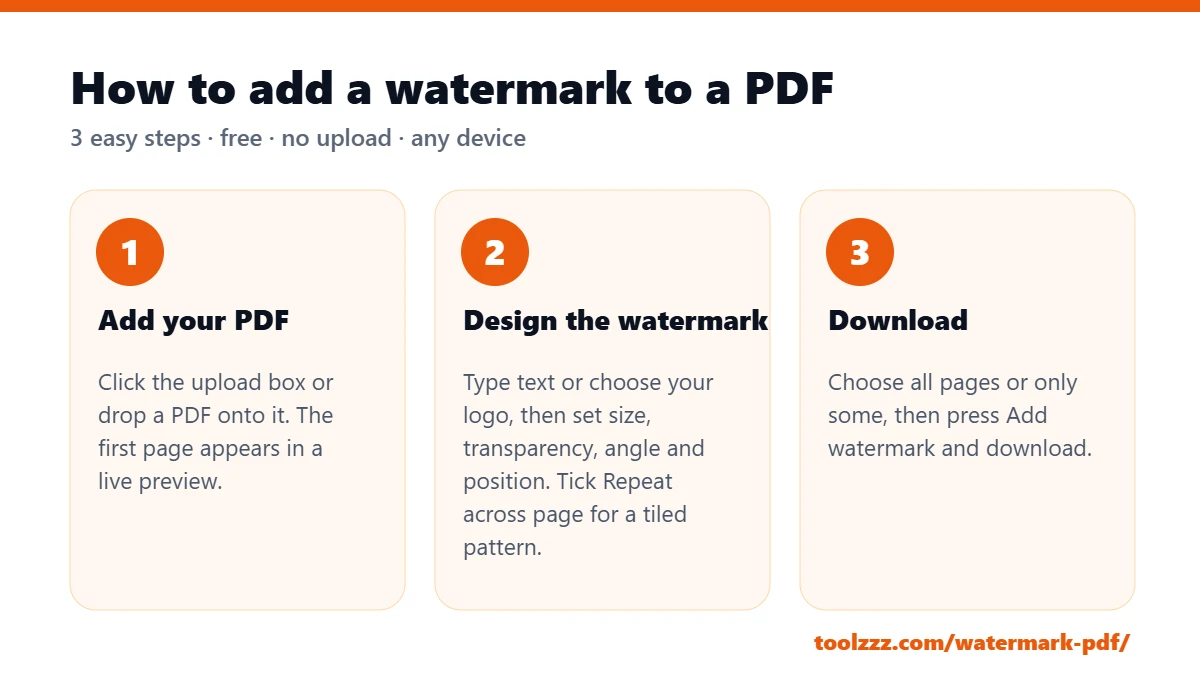
How to add a watermark to a PDF
Mark documents as confidential, draft or yours before you share them.
Add your PDF
Click the upload box or drop a PDF onto it. The first page appears in a live preview.
Design the watermark
Type text or choose your logo, then set size, transparency, angle and position. Tick Repeat across page for a tiled pattern.
Download
Choose all pages or only some, then press Add watermark and download.
Watch: add a CONFIDENTIAL or logo watermark to a PDF
Popular ways to watermark a PDF
Mark documents CONFIDENTIAL
Remind every reader that a contract, report or HR file must not be shared.
Label drafts
Stamp DRAFT on versions that are still being reviewed, so nobody prints the wrong one.
Brand your documents
Add your company logo to proposals, price lists and portfolios.
Protect previews
Tile your name across sample pages of e-books, courses or designs you sell.
Mark copies
Stamp COPY or SAMPLE on certificates and invoices you send for information only.
Watermarks in your language
Use Urdu, Arabic, Hindi, Chinese or any language. Text is drawn as an image, so every script works.
Choosing the right watermark
| Goal | Suggested settings |
|---|---|
| Subtle "Confidential" label | Text, red, size 60%, transparency 15–25%, diagonal, centre |
| Hard-to-remove protection | Text or logo, size 25–35%, transparency 20%, Repeat across page |
| Logo branding | Image, size 15–20%, transparency 60–100%, horizontal, bottom right |
| Draft marking | Text DRAFT, grey, size 70%, transparency 20%, diagonal |
Can a watermark be removed?
A watermark is added on top of each page, which is enough to label documents and discourage copying. Determined people with editing software can sometimes remove a single centred mark. For stronger protection, use a repeated pattern. To hide information completely, use Redact PDF instead, which removes the text for good.
How to watermark a PDF on Windows, Mac, iPhone and Android
No app to install. The tool works in any modern browser, so the steps are almost the same everywhere.
On Windows
- Open toolzzz.com/watermark-pdf/ in Chrome, Edge or Firefox.
- Drag your PDF from File Explorer onto the upload box.
- Type your text or choose a logo, adjust it in the preview, then press Add watermark and download.
- The new PDF is saved to your Downloads folder.
On Mac
- Open the page in Safari, Chrome or Firefox.
- Drag the PDF from Finder onto the upload box.
- Type your text or choose a logo, adjust it in the preview, then press Add watermark and download.
- Find the new file in Downloads.
On iPhone and iPad
- Open the page in Safari.
- Tap the upload box, then Browse to pick the PDF from the Files app.
- Type your text or choose a logo, adjust it in the preview, then press Add watermark and download.
- Tap Download and find the file in Files → Downloads.
On Android
- Open the page in Chrome.
- Tap the upload box and pick the PDF from Files or Downloads.
- Type your text or choose a logo, adjust it in the preview, then press Add watermark and download.
- The new PDF is saved in your Downloads folder.
Toolzzz vs. typical online PDF tools
| Feature | Toolzzz Watermark PDF | Typical online PDF tools |
|---|---|---|
| Your file is uploaded to a server | Never. It is processed in your browser | Usually |
| File size and page limits | None, only your device memory | Often 10 to 100 MB, or a few files per day |
| Watermark on the result | Never | Sometimes on free plans |
| Account or e-mail needed | No | Often for larger files |
| Watermark text in Urdu, Arabic, Hindi or Chinese | Yes, any language | Often Latin letters only |
| Live preview on every page | Yes | Sometimes |
| Repeat (tile) across the page | Yes | Often a paid feature |
| Price | Free | Free with limits, or a paid plan |
"Typical" describes common limits of free online PDF services. Plans and limits differ between sites.
A flexible PDF watermark tool that stays private
Live preview
See the watermark on any page before you download.
Any language
Text is rendered as an image, so every alphabet and emoji works.
Text or logo
Use a word, a sentence or your PNG logo.
9 positions or tiled
Place it once or repeat it across the whole page.
Full control
Size, colour, angle, transparency and page selection.
Private by design
Your PDF and logo never leave your device.
Key terms explained
- Watermark
- A semi-transparent text or image placed on a page to show ownership or status, such as CONFIDENTIAL or DRAFT.
- Opacity / transparency
- How see-through the watermark is. Low values keep the page readable underneath.
- Tiled watermark
- A watermark repeated in a pattern across the whole page, which makes it much harder to crop or remove.
Frequently asked questions
How do I add a watermark to a PDF for free?
Upload the PDF, type your text or choose a logo, adjust the preview and press Add watermark and download. No sign-up or payment.
How do I add CONFIDENTIAL to every page of a PDF?
Press the Confidential quick button, keep All pages selected and download.
Can I use my logo as a PDF watermark?
Yes. Switch to Image / logo and choose a PNG or JPG. Transparent PNG logos look best.
How do I make the watermark transparent?
Move the Transparency slider to the left. 15–30% keeps the text underneath easy to read.
Can I watermark only some pages?
Yes. Choose Only these pages… and type pages like 1, 3-5.
Does it work with Urdu or Arabic text?
Yes. The watermark text is drawn as an image, so any language and script is shown correctly.
Can the watermark be removed?
A tiled watermark is hard to remove. A single mark can sometimes be removed with editing software, so use Redact PDF to hide information for good.
Is my PDF uploaded?
No. The watermark is added in your browser. Nothing is sent to a server.