
Convert JPG to PNG in seconds
To convert a JPG to PNG, drop your JPG or JPEG files into Toolzzz JPG to PNG, wait a moment while each file is converted in your browser, and press Download PNG (or Download all as PNG (ZIP) for several files). PNG is lossless, so the image will not lose any more quality, and you can resize it at the same time. Your photos are never uploaded.
- Lossless PNG output
- Batch convert + ZIP
- Optional resize
- Removes EXIF metadata
- No file size limit
- 100% free, no sign-up
- No watermark
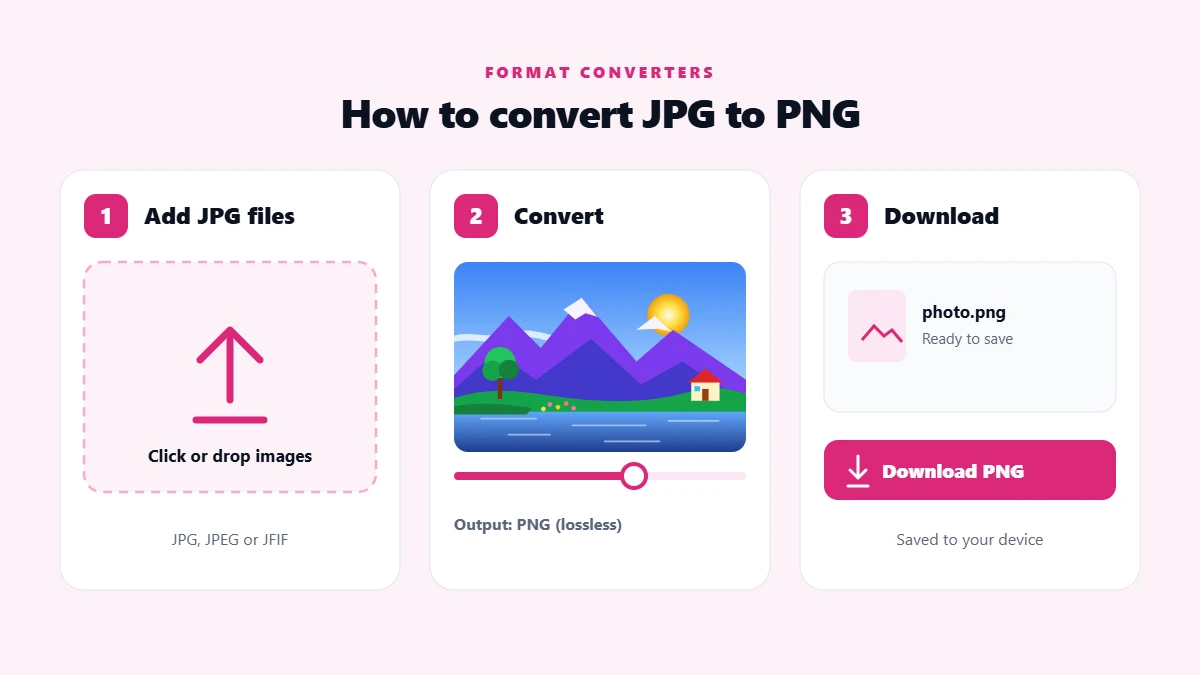
How to convert JPG to PNG
JPG (JPEG) is a lossy format made for photos. PNG is a lossless format that never adds compression artifacts, supports transparency and is preferred for editing, graphics and screenshots.
Add JPG files
Click the upload box or drop one or many .jpg, .jpeg or .jfif files. You can also paste an image with Ctrl + V.
Convert
Each file is converted to PNG instantly. Choose a Max width / height if you also want smaller dimensions.
Download
Press Download PNG, or Download all as PNG (ZIP) for a batch. Each row also has its own download button.
Watch: convert JPG to PNG without losing quality
Popular reasons to convert JPG to PNG
Editing without more loss
Save a working copy as PNG so repeated edits and saves do not add new JPG artifacts.
Add transparency later
PNG supports a transparent background, so you can remove or erase the background in another app.
Upload rules
Some websites, app stores and form portals only accept PNG files.
Documents and slides
PNG keeps text and diagrams crisp when you place images in Word, PowerPoint or Google Slides.
Print shops
Lossless PNG avoids extra compression when sending artwork to print.
Product graphics
Use PNG for product images that will get overlays, badges or text.
JPG vs. PNG: what changes when you convert?
| Feature | JPG / JPEG | PNG |
|---|---|---|
| Compression | Lossy (small files) | Lossless (exact pixels) |
| Transparency | No | Yes (alpha channel) |
| Best for | Photos | Graphics, screenshots, editing |
| Typical size of a 12 MP photo | 2 to 5 MB | 10 to 25 MB |
| Re-saving | Loses a little quality each time | No loss |
Converting JPG to PNG cannot restore detail that JPG compression already removed, but it stops further loss and adds transparency support.
Why is my PNG bigger than the JPG?
PNG stores every pixel exactly, while JPG throws away detail the eye barely sees. For photos, a PNG is usually 3 to 6 times larger. That is normal. If you need a small file for the web, keep the JPG, use JPG to WebP, or shrink it with Compress Image. Choose a smaller Max width / height here to reduce the PNG size.
How to convert JPG to PNG on Windows, Mac, iPhone and Android
No app to install. The tool works in any modern browser, so the steps are almost the same everywhere.
On Windows
- Open toolzzz.com/jpg-to-png/ in Chrome, Edge or Firefox.
- Drag your JPG files from File Explorer onto the upload box.
- Optionally choose a Max width / height, then press Download PNG.
- The new file is saved to your Downloads folder.
On Mac
- Open toolzzz.com/jpg-to-png/ in Safari or Chrome.
- Drag the JPG files from Finder or the Photos app onto the upload box.
- Optionally choose a Max width / height, then press Download PNG.
- Find the result in Downloads (Safari asks first if set to).
On iPhone and iPad
- Open toolzzz.com/jpg-to-png/ in Safari.
- Tap the upload box and choose Photo Library, Take Photo or Choose File.
- Optionally choose a Max width / height, then tap Download PNG.
- Tap Download, then open it from the Files app and choose Save Image to add it to Photos.
On Android
- Open toolzzz.com/jpg-to-png/ in Chrome.
- Tap the upload box and pick the JPG files from your Gallery, Files or camera.
- Optionally choose a Max width / height, then tap Download PNG.
- The image appears in your Downloads folder and in Google Photos under Downloads.
Toolzzz vs. typical online converters
| Feature | Toolzzz JPG to PNG | Typical online converters |
|---|---|---|
| Your files are uploaded to a server | Never. Converted in your browser | Usually |
| Batch conversion | Unlimited files, ZIP download | Often 5 to 20 files |
| Resize while converting | Yes | Rare |
| File size limit | None (your device memory) | Often 5 to 50 MB |
| EXIF and GPS data removed | Yes | Sometimes |
| Waiting in a queue | No, instant | Common |
| Watermark or sign-up | None | Common on free plans |
"Typical" describes common limits of free online services. Plans and limits differ between sites.
A JPG to PNG converter that respects your privacy
Instant
Conversion happens on your device in milliseconds, with no upload and no queue.
Batch + ZIP
Convert a whole folder of JPGs and download all PNGs in one ZIP file.
Lossless output
PNG keeps every pixel exactly. No new compression artifacts.
Optional resize
Limit the width or height to 4K, Full HD, 1080 px or 512 px while converting.
Metadata removed
Camera details and GPS location are not copied into the PNG.
Private
Your photos stay on your device. Nothing is stored or seen by us.
Key terms explained
- Lossless
- Compression that keeps every pixel exactly, like PNG.
- Lossy
- Compression that discards some detail to save space, like JPG.
- Alpha channel
- Extra image data that stores transparency for each pixel.
Frequently asked questions
How do I convert a JPG to PNG for free?
Drop the JPG on this page and press Download PNG. There is no sign-up, no watermark and no limit.
Does converting JPG to PNG improve quality?
No. It keeps the current quality and prevents further loss, but it cannot restore detail already removed by JPG compression.
Will the PNG have a transparent background?
The background stays as it is in the photo. PNG supports transparency, so you can remove the background afterwards in an editor.
Why is the PNG file larger?
PNG is lossless, so it stores every pixel. Photos as PNG are usually several times larger than JPGs.
Can I convert many JPGs to PNG at once?
Yes. Add as many files as you like and press Download all as PNG (ZIP).
Is JPEG the same as JPG?
Yes. JPG and JPEG are the same format; the shorter extension comes from old Windows 3-letter file names.
Can I convert JPG to PNG on iPhone or Android?
Yes. Open this page in Safari or Chrome, tap the upload box and choose photos from your gallery.
Are my files uploaded?
No. The conversion happens in your browser and files never leave your device.