
Convert PNG to JPG in seconds
To convert a PNG to JPG, drop your PNG files into Toolzzz PNG to JPG, keep the quality at 90% (or lower it for smaller files), pick the background color that should replace transparent areas, and press Download JPG. Photos and screenshots usually become 70 to 90% smaller. Files are converted in your browser, never uploaded.
- Quality 10 to 100%
- Custom background color
- Batch convert + ZIP
- Optional resize
- Shows size savings
- 100% free, no sign-up
- No watermark
How to convert PNG to JPG
PNG files are lossless and often very large, especially for photos and screenshots. JPG uses lossy compression that makes files much smaller while looking almost identical, which is ideal for email, websites and upload forms.
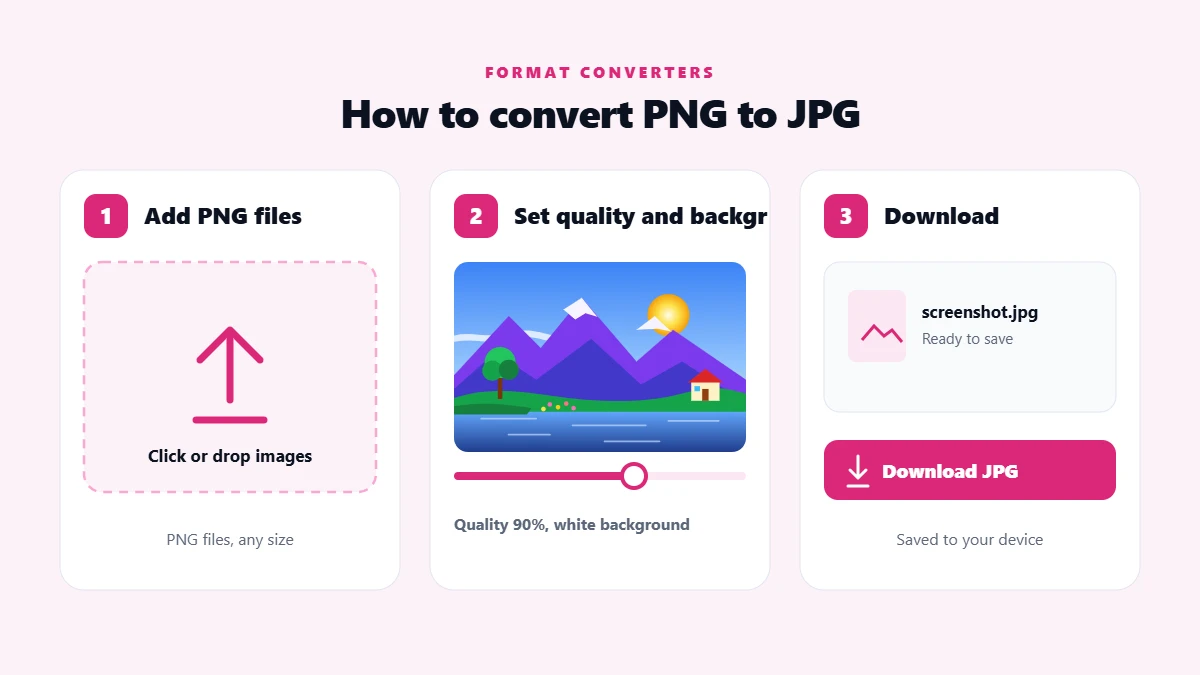
Add PNG files
Click the upload box or drop one or many PNG files. Pasting a screenshot with Ctrl + V works too.
Set quality and background
Keep Quality around 85 to 92% for the best balance. JPG has no transparency, so choose the background color for transparent areas (white by default).
Download
See the new size in the table, then press Download JPG or Download all as JPG (ZIP).
Watch: convert PNG to JPG and shrink file size
Popular reasons to convert PNG to JPG
Smaller email attachments
Turn heavy PNG screenshots and photos into JPGs that fit email and chat limits.
Form and portal uploads
Many job, visa and exam portals accept only JPG files with a size limit.
Faster web pages
JPG photos load much faster than PNG photos on websites and blogs.
Free up storage
Convert large PNG screenshots from your phone or PC to save space.
Marketplace listings
Some marketplaces prefer JPG product photos and reject transparent PNGs.
Photo printing
Most photo printing services and kiosks expect JPG files.
Choosing the right JPG quality
| Quality | Look | Typical saving vs. PNG |
|---|---|---|
| 95 to 100% | Visually identical, larger files | 50 to 70% |
| 85 to 92% | Excellent, best balance | 70 to 85% |
| 70 to 80% | Very good for web and social | 85 to 92% |
| Below 60% | Visible blocks around edges and text | 90%+ |
Need an exact file size such as 100 KB? Use Compress Image to 100KB after converting.
What happens to transparent PNG backgrounds?
JPG cannot store transparency, so every transparent or semi-transparent pixel is blended onto a solid color. Toolzzz uses white by default, which is right for documents and most websites. Pick black or your brand color with the color picker if the image will sit on a dark background. If you need to keep transparency, use Image Converter to save as WebP instead, which supports transparency and is still much smaller than PNG.
How to convert PNG to JPG on Windows, Mac, iPhone and Android
No app to install. The tool works in any modern browser, so the steps are almost the same everywhere.
On Windows
- Open toolzzz.com/png-to-jpg/ in Chrome, Edge or Firefox.
- Drag your PNG files from File Explorer onto the upload box.
- Set the Quality and background color, then press Download JPG.
- The new file is saved to your Downloads folder.
On Mac
- Open toolzzz.com/png-to-jpg/ in Safari or Chrome.
- Drag the PNG files from Finder or the Photos app onto the upload box.
- Set the Quality and background color, then press Download JPG.
- Find the result in Downloads (Safari asks first if set to).
On iPhone and iPad
- Open toolzzz.com/png-to-jpg/ in Safari.
- Tap the upload box and choose Photo Library, Take Photo or Choose File.
- Set the Quality and background color, then tap Download JPG.
- Tap Download, then open it from the Files app and choose Save Image to add it to Photos.
On Android
- Open toolzzz.com/png-to-jpg/ in Chrome.
- Tap the upload box and pick the PNG files from your Gallery, Files or camera.
- Set the Quality and background color, then tap Download JPG.
- The image appears in your Downloads folder and in Google Photos under Downloads.
Toolzzz vs. typical online converters
| Feature | Toolzzz PNG to JPG | Typical online converters |
|---|---|---|
| Your files are uploaded to a server | Never. Converted in your browser | Usually |
| Quality control | 10 to 100% slider | Often fixed |
| Background color for transparency | Any color | Usually black or white only |
| See size before downloading | Yes, per file | Rare |
| Batch conversion + ZIP | Unlimited | Often limited |
| Resize while converting | Yes | Rare |
| Watermark or sign-up | None | Common |
"Typical" describes common limits of free online services. Plans and limits differ between sites.
A PNG to JPG converter with real control
Quality slider
Choose exactly how much to compress, from maximum quality to the smallest file.
Background color
Replace transparency with white, black or any brand color.
See the savings
The table shows the original and converted size of every file.
Batch + ZIP
Convert hundreds of PNGs and download them all at once.
Optional resize
Shrink large screenshots to Full HD or 1080 px in the same step.
Private
Nothing is uploaded. Ideal for screenshots that contain private data.
Key terms explained
- JPG quality
- A 0 to 100 setting that trades file size for detail. Higher means bigger and sharper.
- Transparency
- Pixels that are fully or partly see-through. PNG supports them; JPG does not.
- Compression artifacts
- Blocky or blurry patches caused by strong lossy compression.
Frequently asked questions
How do I convert PNG to JPG for free?
Drop the PNG on this page and press Download JPG. No sign-up, no watermark and no limits.
Will converting PNG to JPG reduce quality?
Slightly, because JPG is lossy. At 85 to 92% quality the difference is almost impossible to see.
What happens to the transparent background?
JPG has no transparency, so transparent areas are filled with the background color you choose. White is the default.
How much smaller will the file be?
Photos and screenshots usually shrink by 70 to 90%. The table shows the exact size before you download.
Can I convert several PNGs at once?
Yes. Add many files and press Download all as JPG (ZIP).
Should I use JPG or PNG for logos?
Use PNG (or SVG) for logos and graphics with sharp edges or transparency. Use JPG for photos.
Does it work on my phone?
Yes, on iPhone, iPad and Android in any modern browser.
Are my images uploaded?
No. Everything is converted in your browser and stays on your device.