
Convert WebP to JPG in seconds
To convert WebP to JPG, drop your .webp files into Toolzzz WebP to JPG, keep the quality at 90% and press Download JPG (or Download all as JPG (ZIP)). Transparent areas are filled with white or a color you choose. The conversion runs in your browser, so nothing is uploaded.
- Batch convert + ZIP
- Quality 10 to 100%
- Background color option
- Optional resize
- Shows file sizes
- 100% free, no sign-up
- No watermark
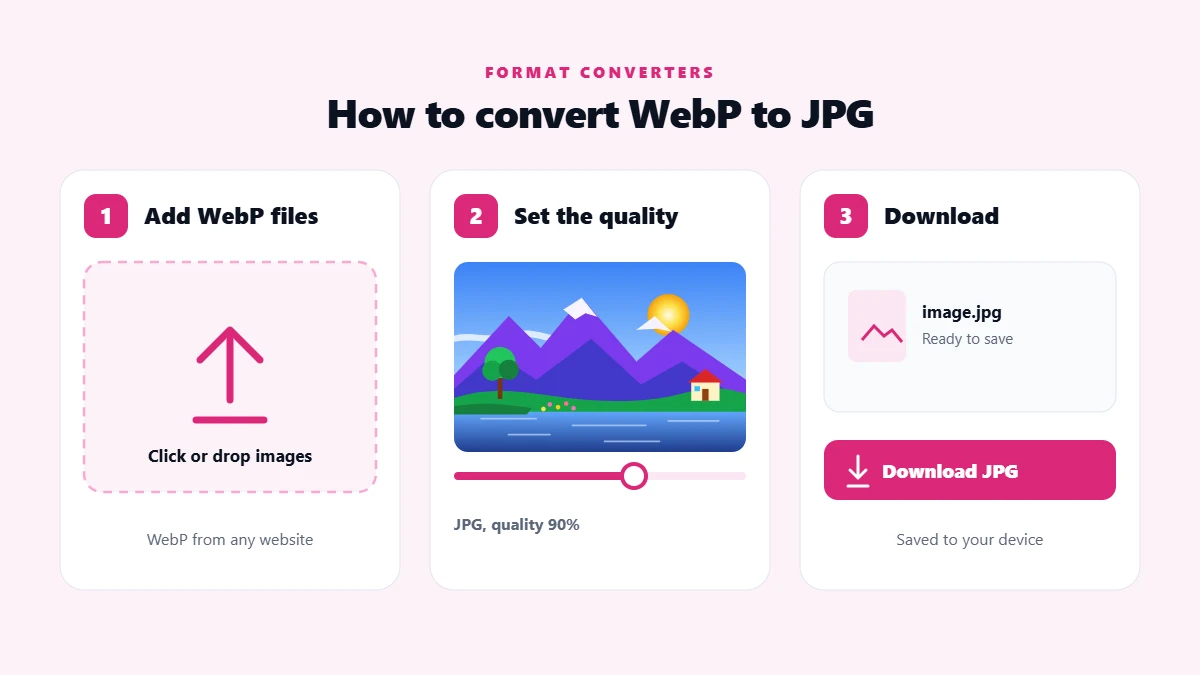
How to convert WebP to JPG
WebP is a modern image format by Google that most websites now use because it is small and fast. When you save an image from the web, you often get a .webp file that older apps, editors and upload forms will not accept. JPG fixes that.
Add WebP files
Click the upload box or drop one or many .webp images saved from websites.
Set the quality
90% keeps the image looking the same. Choose a background color for transparent WebPs and a max size if needed.
Download
Press Download JPG or Download all as JPG (ZIP).
Watch: convert WebP images to JPG
Popular reasons to convert WebP to JPG
Edit in older software
Older versions of Photoshop, Paint and many apps cannot open WebP files.
Upload forms
Many forms, portals and services still accept only JPG or PNG.
Share anywhere
Send images that open on every phone, email client and messaging app.
Photo printers and print shops expect JPG files.
Office documents
Older Word and PowerPoint versions do not support WebP images.
Product research
Save supplier or reference images as JPG for catalogs and spreadsheets.
WebP vs. JPG
| Feature | WebP | JPG |
|---|---|---|
| File size | 25 to 35% smaller | Larger |
| Transparency | Yes | No |
| Animation | Yes | No |
| Compatibility | Modern browsers and apps | Everything, including very old software |
| Best for | Websites | Sharing, printing, editing anywhere |
Animated WebP files are converted using their first frame. Need to keep transparency? Use WebP to PNG.
Why do websites save images as WebP?
Google created WebP in 2010 to make the web faster. A WebP is typically 25 to 35% smaller than a JPG of the same quality, which speeds up pages and improves Core Web Vitals. That is why sites like Google, YouTube, Shopify and WordPress serve WebP by default. It is great for websites, but less convenient once the image is on your computer, which is when converting to JPG helps.
How to convert WebP to JPG on Windows, Mac, iPhone and Android
No app to install. The tool works in any modern browser, so the steps are almost the same everywhere.
On Windows
- Open toolzzz.com/webp-to-jpg/ in Chrome, Edge or Firefox.
- Drag your WebP files from File Explorer onto the upload box.
- Set the Quality if needed, then press Download JPG.
- The new file is saved to your Downloads folder.
On Mac
- Open toolzzz.com/webp-to-jpg/ in Safari or Chrome.
- Drag the WebP files from Finder or the Photos app onto the upload box.
- Set the Quality if needed, then press Download JPG.
- Find the result in Downloads (Safari asks first if set to).
On iPhone and iPad
- Open toolzzz.com/webp-to-jpg/ in Safari.
- Tap the upload box and choose Photo Library, Take Photo or Choose File.
- Set the Quality if needed, then tap Download JPG.
- Tap Download, then open it from the Files app and choose Save Image to add it to Photos.
On Android
- Open toolzzz.com/webp-to-jpg/ in Chrome.
- Tap the upload box and pick the WebP files from your Gallery, Files or camera.
- Set the Quality if needed, then tap Download JPG.
- The image appears in your Downloads folder and in Google Photos under Downloads.
Toolzzz vs. typical online converters
| Feature | Toolzzz WebP to JPG | Typical online converters |
|---|---|---|
| Your files are uploaded to a server | Never. Converted in your browser | Usually |
| Batch conversion + ZIP | Unlimited | Often limited |
| Quality control | 10 to 100% | Often fixed |
| Background color for transparency | Any color | Usually black or white |
| Resize while converting | Yes | Rare |
| File size limit | None | Often limited |
| Watermark or sign-up | None | Common |
"Typical" describes common limits of free online services. Plans and limits differ between sites.
A WebP to JPG converter that just works
Instant
Your browser already understands WebP, so conversion takes milliseconds.
Batch + ZIP
Convert a folder of downloaded WebP images in one go.
Quality slider
Balance size and sharpness from 10 to 100%.
Background color
Choose what replaces transparent areas.
Optional resize
Limit the width or height while converting.
Private
Images never leave your device.
Key terms explained
- WebP
- A modern image format by Google with lossy and lossless compression, transparency and animation.
- First frame
- The first image of an animation, used when converting animated WebP to a still JPG.
- Core Web Vitals
- Google's page speed metrics, which smaller images like WebP help improve.
Frequently asked questions
How do I convert WebP to JPG for free?
Drop the WebP file on this page and press Download JPG. No sign-up and no watermark.
Why do images save as WebP?
Most websites serve WebP because it is smaller and loads faster. Your browser saves the file in the format the site sent.
Will I lose quality?
Very little. At 90% quality the JPG looks the same as the WebP.
What happens to transparent WebP images?
JPG has no transparency, so transparent areas are filled with your chosen background color. Use WebP to PNG to keep transparency.
Can I convert animated WebP?
The first frame is converted to a still JPG.
Can I convert many WebP files at once?
Yes. Add them all and press Download all as JPG (ZIP).
Does it work on phones?
Yes, on iPhone, iPad and Android.
Are my files uploaded?
No. Everything happens in your browser.