
Convert HEIC to JPG in seconds
To convert HEIC to JPG, drop your iPhone .heic or .heif photos into Toolzzz HEIC to JPG, keep JPG selected (or choose PNG), and press Download JPG or Download all as JPG (ZIP). The HEIC decoder runs inside your browser, so your private photos are never uploaded to a server.
- HEIC + HEIF support
- JPG or PNG output
- Batch convert + ZIP
- Quality 10 to 100%
- No upload, private
- 100% free, no sign-up
- No watermark
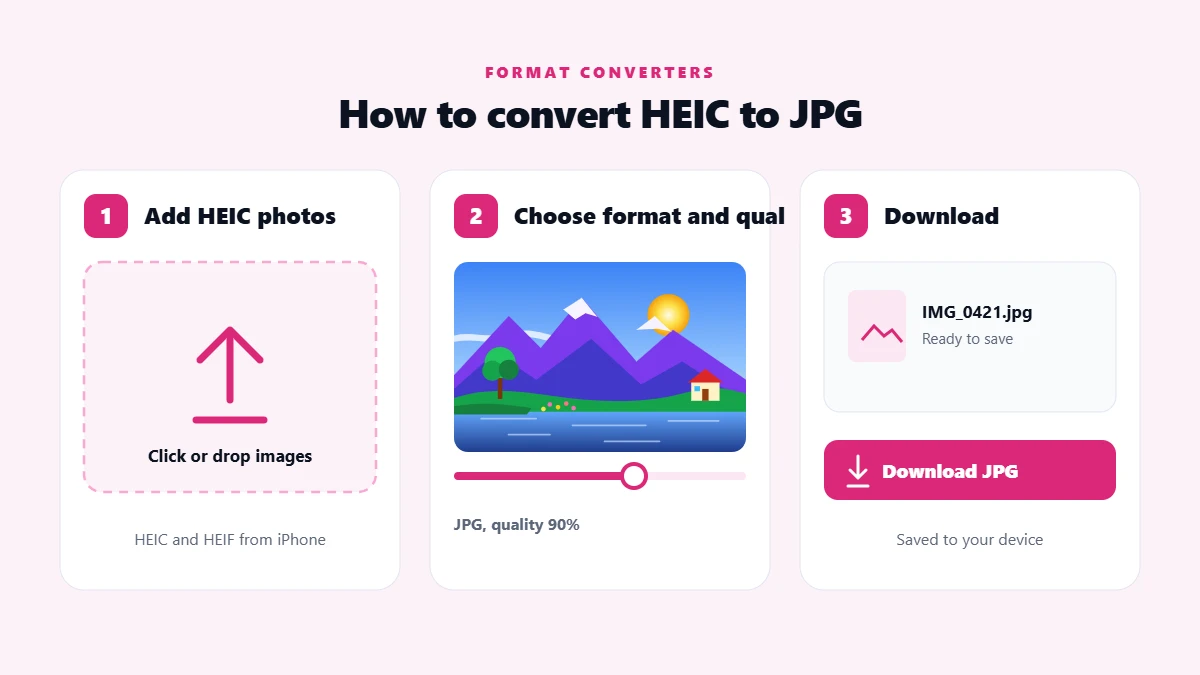
How to convert HEIC to JPG
HEIC (High Efficiency Image Container) is the default photo format on iPhone and iPad since iOS 11. It saves space, but many Windows PCs, websites, printers and older apps cannot open it. Converting to JPG makes your photos work everywhere.
Add HEIC photos
Click the upload box or drop your .heic or .heif files. Transfer them from iPhone via AirDrop, iCloud, USB or the Files app.
Choose format and quality
JPG gives small, universal files. PNG is lossless. Keep JPG quality around 90%.
Download
Press Download JPG for one photo or Download all as JPG (ZIP) for an album.
Watch: convert iPhone HEIC photos to JPG for free
Popular reasons to convert HEIC to JPG
Open photos on Windows
Windows often needs a paid extension to view HEIC. JPG opens in every viewer.
Upload to websites
Most websites, forms and social networks reject .heic uploads but accept JPG.
Print your photos
Photo labs, kiosks and home printers expect JPG files.
Share with anyone
Android users and older devices may not open HEIC images you send them.
Office documents
Insert photos into Word, PowerPoint and PDFs without compatibility problems.
Online selling
Marketplaces such as eBay and Etsy work best with JPG product photos.
HEIC vs. JPG compared
| Feature | HEIC / HEIF | JPG |
|---|---|---|
| File size | About half of JPG | Larger |
| Compatibility | Apple devices, some apps | Everything |
| Color depth | Up to 10-bit (HDR) | 8-bit |
| Live Photos and bursts | Can store several images | One image |
| Web browser support | Safari only | All browsers |
If a HEIC file contains several images (for example a burst), the first image is converted.
Stop your iPhone from saving HEIC
To make your iPhone shoot JPG instead of HEIC, open Settings > Camera > Formats and choose Most Compatible. New photos will be saved as JPG, but files will be about twice as large. Alternatively, keep HEIC to save space and let iPhone convert automatically when sharing: Settings > Photos > Transfer to Mac or PC > Automatic.
For photos already on your computer, this converter is the fastest option: no app, no account and no upload.
How to convert HEIC to JPG on Windows, Mac, iPhone and Android
No app to install. The tool works in any modern browser, so the steps are almost the same everywhere.
On Windows
- Open toolzzz.com/heic-to-jpg/ in Chrome, Edge or Firefox.
- Drag your HEIC photos from File Explorer onto the upload box.
- Choose JPG or PNG and the quality, then press Download JPG.
- The new file is saved to your Downloads folder.
On Mac
- Open toolzzz.com/heic-to-jpg/ in Safari or Chrome.
- Drag the HEIC photos from Finder or the Photos app onto the upload box.
- Choose JPG or PNG and the quality, then press Download JPG.
- Find the result in Downloads (Safari asks first if set to).
On iPhone and iPad
- Open toolzzz.com/heic-to-jpg/ in Safari.
- Tap the upload box and choose Photo Library, Take Photo or Choose File.
- Choose JPG or PNG and the quality, then tap Download JPG.
- Tap Download, then open it from the Files app and choose Save Image to add it to Photos.
On Android
- Open toolzzz.com/heic-to-jpg/ in Chrome.
- Tap the upload box and pick the HEIC photos from your Gallery, Files or camera.
- Choose JPG or PNG and the quality, then tap Download JPG.
- The image appears in your Downloads folder and in Google Photos under Downloads.
Toolzzz vs. typical online HEIC converters
| Feature | Toolzzz HEIC to JPG | Typical online converters |
|---|---|---|
| Your photos are uploaded to a server | Never. Decoded in your browser | Usually |
| Output formats | JPG or PNG | Often JPG only |
| Batch conversion + ZIP | Unlimited | Often 5 to 50 files |
| Quality control | 10 to 100% | Rare |
| File size limit | None | Often limited |
| Works offline after loading | Yes | No |
| Watermark or sign-up | None | Common |
"Typical" describes common limits of free online services. Plans and limits differ between sites.
A private HEIC converter for your iPhone photos
Private photos stay private
Personal photos are decoded on your device. They are never uploaded or stored.
Whole albums at once
Drop hundreds of HEIC photos and download every JPG in one ZIP.
JPG or PNG
Choose small JPGs with adjustable quality, or lossless PNG.
Optional resize
Shrink photos to Full HD or 1080 px while converting for easy sharing.
Location data removed
GPS and camera metadata are not copied into the new file.
Fast
Modern browsers decode HEIC quickly; Safari even does it natively.
Key terms explained
- HEIC
- High Efficiency Image Container, Apple's photo format based on HEVC (H.265) compression.
- HEIF
- High Efficiency Image File Format, the standard behind HEIC.
- Most Compatible
- An iPhone camera setting that saves photos as JPG instead of HEIC.
Frequently asked questions
How do I convert HEIC to JPG for free?
Drop your HEIC photos on this page and press Download JPG. No app, no sign-up and no watermark.
Is it safe to convert private photos here?
Yes. Photos are decoded in your browser and never uploaded, so nobody else can see them.
Why can't I open HEIC files on Windows?
Windows needs the HEIF and HEVC extensions to view HEIC. Converting to JPG avoids that completely.
Does converting HEIC to JPG lose quality?
JPG is slightly lossy. At 90% quality the difference is not visible. Choose PNG for a lossless copy.
Can I convert many HEIC files at once?
Yes. Add a whole album and press Download all as JPG (ZIP).
Why is the first conversion slower?
In Chrome, Edge and Firefox the HEIC decoder is loaded once (about 1.3 MB). After that, conversions are fast.
How do I make my iPhone save JPG instead of HEIC?
Go to Settings, Camera, Formats and choose Most Compatible.
Does it work on Android and iPhone?
Yes. It works in any modern mobile browser.