
Convert PSD to JPG without Photoshop
To convert a PSD to JPG, drop your Photoshop .psd file into Toolzzz PSD to JPG, choose JPG (or PNG to keep transparency), and press Download JPG. The tool reads the merged (flattened) image stored in the PSD and converts it in your browser, so your design files are never uploaded.
- No Photoshop needed
- JPG or PNG output
- Transparency with PNG
- Batch convert + ZIP
- Optional resize
- 100% free, no sign-up
- No upload
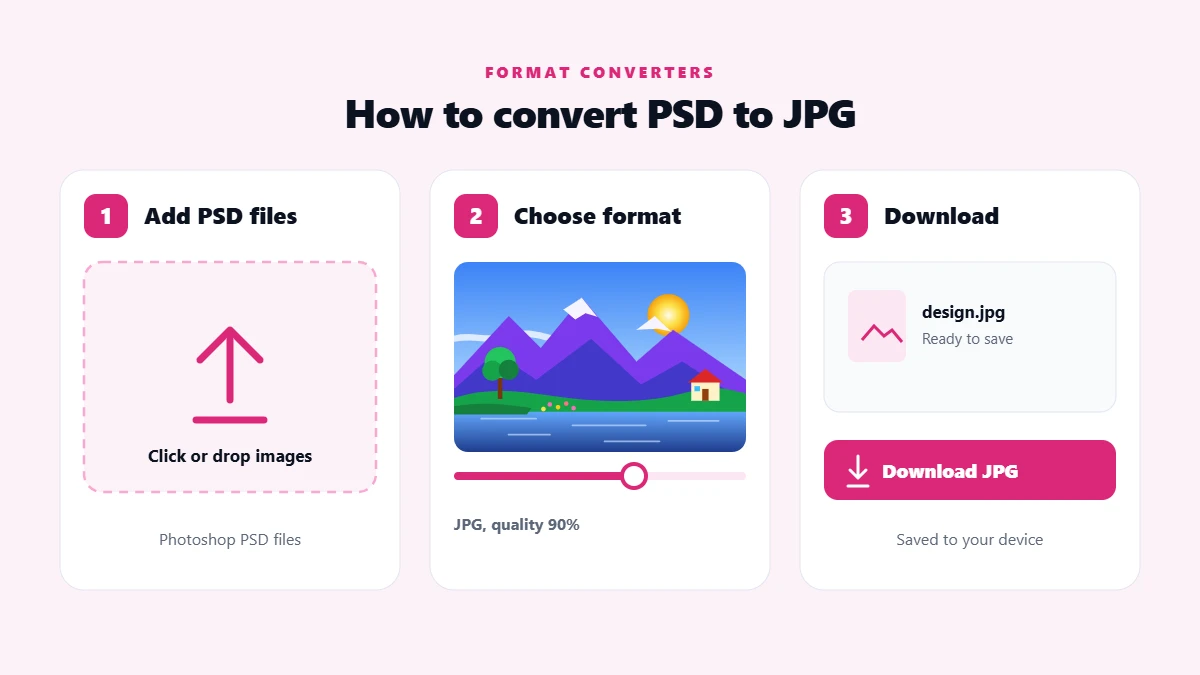
How to convert PSD to JPG
PSD is Adobe Photoshop's layered file format. Clients, colleagues and websites usually need a simple JPG or PNG preview instead. This converter extracts the full composite image that Photoshop saves inside the PSD.
Add PSD files
Click the upload box or drop one or many .psd files. The PSD reader loads once the first time.
Choose format
JPG for small previews and sharing, PNG to keep a transparent background. Optionally set a max size.
Download
Press Download JPG or Download all as JPG (ZIP).
Watch: convert PSD files to JPG without Photoshop
Popular reasons to convert PSD to JPG
Send previews to clients
Share a quick JPG of a design without sending the heavy PSD.
Upload to websites
Portfolios, CMSs and marketplaces need JPG or PNG files.
Template marketplaces
Create preview images of PSD mockups and templates.
Print proofs
Send flattened JPGs to print shops for proofing.
Documentation
Add design screenshots to briefs, specs and presentations.
No Photoshop license
View and convert PSD files on any computer or phone.
What is converted from a PSD?
| Part of the PSD | Converted? |
|---|---|
| Merged (composite) image of all visible layers | Yes |
| Transparency | Yes, with PNG output |
| Individual layers | No, the flattened result is exported |
| Hidden layers | No (as saved in Photoshop) |
| Very large PSB files | Not supported |
"This PSD has no merged image"
Photoshop stores a ready-made composite image in the PSD only when Maximize PSD and PSB File Compatibility is turned on (it is on by default). If you see this message, open the file in Photoshop, go to Preferences > File Handling, set compatibility to Always, and save the PSD again. Files exported from GIMP, Photopea and Affinity usually include the composite automatically.
How to convert PSD to JPG on Windows, Mac, iPhone and Android
No app to install. The tool works in any modern browser, so the steps are almost the same everywhere.
On Windows
- Open toolzzz.com/psd-to-jpg/ in Chrome, Edge or Firefox.
- Drag your PSD files from File Explorer onto the upload box.
- Choose JPG or PNG and the quality, then press Download JPG.
- The new file is saved to your Downloads folder.
On Mac
- Open toolzzz.com/psd-to-jpg/ in Safari or Chrome.
- Drag the PSD files from Finder or the Photos app onto the upload box.
- Choose JPG or PNG and the quality, then press Download JPG.
- Find the result in Downloads (Safari asks first if set to).
On iPhone and iPad
- Open toolzzz.com/psd-to-jpg/ in Safari.
- Tap the upload box and choose Photo Library, Take Photo or Choose File.
- Choose JPG or PNG and the quality, then tap Download JPG.
- Tap Download, then open it from the Files app and choose Save Image to add it to Photos.
On Android
- Open toolzzz.com/psd-to-jpg/ in Chrome.
- Tap the upload box and pick the PSD files from your Gallery, Files or camera.
- Choose JPG or PNG and the quality, then tap Download JPG.
- The image appears in your Downloads folder and in Google Photos under Downloads.
Toolzzz vs. typical online converters
| Feature | Toolzzz PSD to JPG | Typical online converters |
|---|---|---|
| Your files are uploaded to a server | Never. Read in your browser | Usually |
| Output formats | JPG or PNG with transparency | Often JPG only |
| Batch conversion + ZIP | Unlimited | Often limited |
| File size limit | Your device memory | Often 50 to 100 MB |
| Resize while converting | Yes | Rare |
| Confidential designs stay private | Yes | No |
| Watermark or sign-up | None | Common |
"Typical" describes common limits of free online services. Plans and limits differ between sites.
A PSD converter that keeps client work confidential
Confidential
Unreleased designs are processed locally. Nothing reaches a server.
Composite image
Exports exactly what Photoshop shows with all visible layers merged.
Transparency
Choose PNG to keep transparent areas.
Batch + ZIP
Convert a folder of PSD files at once.
Resize
Create smaller previews with a max size.
No install
Works in your browser on Windows, Mac, Linux and mobile.
Key terms explained
- PSD
- Photoshop Document, Adobe's layered image format.
- Composite image
- The flattened image of all visible layers, saved inside the PSD for compatibility.
- PSB
- Photoshop Big, a format for very large documents over 2 GB or 30,000 px.
Frequently asked questions
How do I convert PSD to JPG without Photoshop?
Drop the PSD on this page and press Download JPG. No Photoshop, app or account needed.
Can I keep the transparent background?
Yes. Choose PNG as the output format.
Can I export individual layers?
No. The tool exports the merged image of all visible layers.
Why does my PSD fail to open?
It probably has no composite image. Save it again in Photoshop with Maximize Compatibility turned on.
Is there a file size limit?
There is no fixed limit, but very large PSDs need enough memory on your device.
Can I convert many PSDs at once?
Yes. Add them all and press Download all as JPG (ZIP).
Does it work on Mac and phones?
Yes, in any modern browser.
Are my design files uploaded?
No. They are read and converted in your browser.