
Extract frames from a GIF in seconds
To extract frames from a GIF, drop it into Toolzzz Extract GIF Frames. Every frame appears with its number and duration. Click any frame to download it, or choose All, Every 2nd, Every 5th or Every 10th frame, pick PNG or JPG, and press Download all frames (ZIP). Frames are fully composited, so each one looks exactly as it appears in the animation.
- Full frames, not fragments
- PNG or JPG
- Every Nth frame option
- Frame numbers and durations
- Single-frame download
- 100% free, no sign-up
- No upload
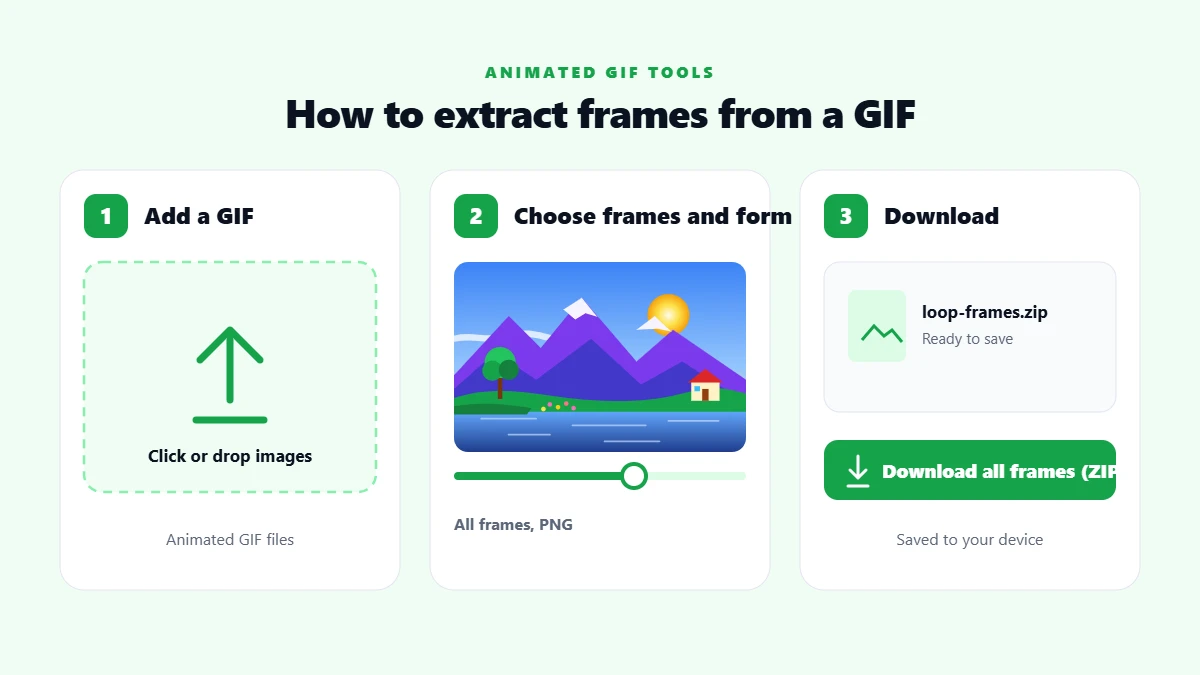
How to extract frames from a GIF
GIF files often store only the changed part of each frame. This tool rebuilds every frame completely (handling transparency and disposal methods), so the images you get look exactly like the animation at that moment.
Add a GIF
Click the upload box or drop an animated GIF. All frames appear in a grid.
Choose frames and format
Pick all frames or every 2nd, 5th or 10th, and choose PNG (lossless, keeps transparency) or JPG.
Download
Click a single frame to save it, or press Download all frames (ZIP).
Watch: split a GIF into separate frames
Popular reasons to extract GIF frames
Grab the best still
Save the perfect moment from a GIF as a picture.
Edit frame by frame
Edit frames in Photoshop or Procreate and rebuild with GIF Maker.
Sprite sheets
Use frames as sprites for games and web animations.
Documentation
Use individual steps from a screen GIF as screenshots.
Print a sequence
Print frames as a flip book or storyboard.
Analyze motion
Study movement in sports, science or animation frame by frame.
PNG or JPG frames?
| Format | Pros | Best for |
|---|---|---|
| PNG | Lossless, keeps transparency | Editing, stickers, sprites |
| JPG | Smaller files, white background | Sharing, documents, printing |
Files are named with the frame number (for example loop-frame-007.png) so they stay in order.
How to extract frames from a GIF on Windows, Mac, iPhone and Android
No app to install. The tool works in any modern browser, so the steps are almost the same everywhere.
On Windows
- Open toolzzz.com/extract-gif-frames/ in Chrome, Edge or Firefox.
- Drag your GIF from File Explorer onto the upload box.
- Choose which frames and the format, then press Download all frames (ZIP), then press Download all frames (ZIP).
- The new file is saved to your Downloads folder.
On Mac
- Open toolzzz.com/extract-gif-frames/ in Safari or Chrome.
- Drag the GIF from Finder or the Photos app onto the upload box.
- Choose which frames and the format, then press Download all frames (ZIP), then press Download all frames (ZIP).
- Find the result in Downloads (Safari asks first if set to).
On iPhone and iPad
- Open toolzzz.com/extract-gif-frames/ in Safari.
- Tap the upload box and choose Photo Library, Take Photo or Choose File.
- Choose which frames and the format, then press Download all frames (ZIP), then tap Download all frames (ZIP).
- Tap Download, then open it from the Files app and choose Save Image to add it to Photos.
On Android
- Open toolzzz.com/extract-gif-frames/ in Chrome.
- Tap the upload box and pick the GIF from your Gallery, Files or camera.
- Choose which frames and the format, then press Download all frames (ZIP), then tap Download all frames (ZIP).
- The image appears in your Downloads folder and in Google Photos under Downloads.
Toolzzz vs. typical online GIF splitters
| Feature | Toolzzz Extract GIF Frames | Typical splitters |
|---|---|---|
| Your GIF is uploaded to a server | Never. Split in your browser | Usually |
| Complete, composited frames | Yes | Sometimes only partial layers |
| Frame durations shown | Yes | Rare |
| Every Nth frame | Yes | Rare |
| PNG or JPG | Both | Often PNG only |
| ZIP download | Yes | Often paid |
| Sign-up required | No | Common |
"Typical" describes common limits of free online services. Plans and limits differ between sites.
A GIF frame extractor that gets every frame right
Visual grid
See every frame with its number and duration.
Fully composited
Partial frames, transparency and disposal are handled correctly.
One or all
Click a frame to save it, or download all in one ZIP.
Every Nth frame
Skip frames for long animations.
PNG or JPG
Lossless with transparency, or small and universal.
Private
No upload, no watermark.
Key terms explained
- Frame disposal
- A GIF setting that tells what happens to a frame before the next one is drawn.
- Composited frame
- A full image built from the frame plus everything visible from earlier frames.
- Sprite sheet
- A set of animation frames used in games and web graphics.
Frequently asked questions
How do I extract frames from a GIF for free?
Drop the GIF here and press Download all frames (ZIP), or click any frame to save it.
Will frames look exactly like the animation?
Yes. Frames are rebuilt completely, including transparency and disposal.
Can I get PNG frames with transparency?
Yes. Choose PNG; transparent areas stay transparent.
How do I extract only some frames?
Choose Every 2nd, 5th or 10th frame, or click individual frames.
How are the files named?
With the GIF name and a 3-digit frame number, so they sort in order.
Can I turn the frames back into a GIF?
Yes, use GIF Maker.
Does it work on mobile?
Yes, in any modern browser.
Is my GIF uploaded?
No. Frames are extracted in your browser.