
Change the speed of a GIF in seconds
To change GIF speed, drop the GIF into Toolzzz Change GIF Speed, move the Speed slider (25% to 400%) or click 0.5x, 1.5x, 2x or 4x, watch the live preview, and press Create GIF. You can also set every frame to a fixed duration in milliseconds. No frames are removed, so the animation stays smooth.
- 0.25x to 4x speed
- One-click presets
- Fixed frame duration
- Live preview
- No frames lost
- 100% free, no sign-up
- No watermark
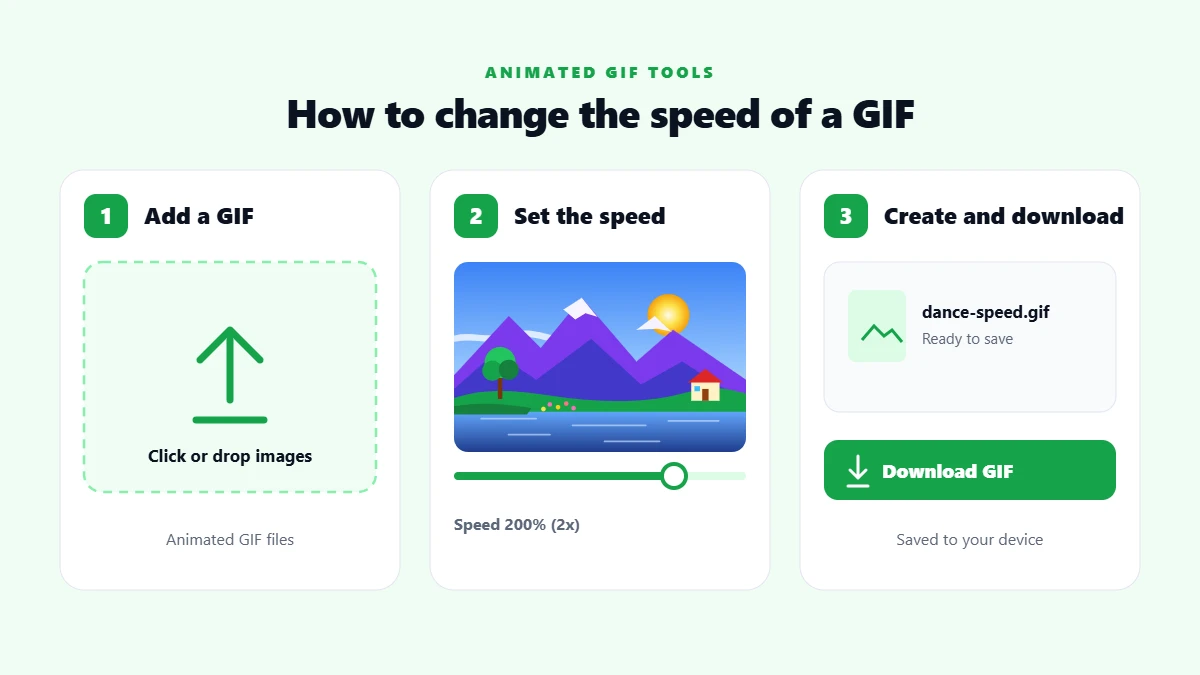
How to change the speed of a GIF
Each GIF frame stores its own display time. Changing the speed rescales those times: shorter times make the GIF faster, longer times make it slower, while all frames are kept.
Add a GIF
Click the upload box or drop an animated GIF.
Set the speed
Drag Speed or click a preset. Or type a fixed duration for every frame (for example 100 ms).
Create and download
Press Create GIF and then Download GIF.
Watch: speed up or slow down a GIF
Popular reasons to change GIF speed
Speed up slow GIFs
Fix GIFs made from video that feel sluggish.
Slow motion
Slow down action to show details in sports, dance or tutorials.
Readable tutorials
Slow down screen GIFs so viewers can follow each step.
Funny effects
Hyper-fast or super-slow reactions get more laughs.
Consistent timing
Set all frames to the same duration for an even rhythm.
Sync with music
Match the loop to a beat for edits and presentations.
Speed and frame duration
| Speed | 100 ms frame becomes | Effect |
|---|---|---|
| 25% | 400 ms | Very slow motion |
| 50% | 200 ms | Half speed |
| 200% | 50 ms | Double speed |
| 400% | 25 ms | Very fast |
Why can't my GIF go faster?
GIF stores frame duration in hundredths of a second, and browsers treat very short durations (below 20 ms, and often 0 or 10 ms) as 100 ms, which can make a "fast" GIF look slow. Toolzzz never writes durations below 20 ms to avoid this. If a GIF already uses 20 ms frames, it cannot be made faster without dropping frames; trim it with Trim GIF or convert it to video with GIF to MP4.
How to change the speed of a GIF on Windows, Mac, iPhone and Android
No app to install. The tool works in any modern browser, so the steps are almost the same everywhere.
On Windows
- Open toolzzz.com/change-gif-speed/ in Chrome, Edge or Firefox.
- Drag your GIF from File Explorer onto the upload box.
- Move the Speed slider or pick 0.5x, 1.5x, 2x or 4x, then press Create GIF, then press Download GIF.
- The new file is saved to your Downloads folder.
On Mac
- Open toolzzz.com/change-gif-speed/ in Safari or Chrome.
- Drag the GIF from Finder or the Photos app onto the upload box.
- Move the Speed slider or pick 0.5x, 1.5x, 2x or 4x, then press Create GIF, then press Download GIF.
- Find the result in Downloads (Safari asks first if set to).
On iPhone and iPad
- Open toolzzz.com/change-gif-speed/ in Safari.
- Tap the upload box and choose Photo Library, Take Photo or Choose File.
- Move the Speed slider or pick 0.5x, 1.5x, 2x or 4x, then press Create GIF, then tap Download GIF.
- Tap Download, then open it from the Files app and choose Save Image to add it to Photos.
On Android
- Open toolzzz.com/change-gif-speed/ in Chrome.
- Tap the upload box and pick the GIF from your Gallery, Files or camera.
- Move the Speed slider or pick 0.5x, 1.5x, 2x or 4x, then press Create GIF, then tap Download GIF.
- The image appears in your Downloads folder and in Google Photos under Downloads.
Toolzzz vs. typical online GIF speed tools
| Feature | Toolzzz Change GIF Speed | Typical tools |
|---|---|---|
| Your GIF is uploaded to a server | Never. Changed in your browser | Usually |
| Speed range | 0.25x to 4x, in 5% steps | Often a few fixed steps |
| Fixed duration for all frames | Yes | Rare |
| Safe minimum 20 ms | Yes | Often ignored |
| Live preview | Yes | Rare |
| Watermark | None | Common |
| Sign-up required | No | Common |
"Typical" describes common limits of free online services. Plans and limits differ between sites.
Smooth GIF speed control
Fine control
Any speed from 25% to 400% in 5% steps.
Fixed duration
Set every frame to the same time for even motion.
Live preview
The preview plays at the new speed, so you can judge it before saving.
No frames lost
All frames are kept, so motion stays smooth.
Browser-safe timing
Never below 20 ms, so all browsers play it correctly.
Private
No upload, no watermark.
Key terms explained
- Frame delay
- The time a GIF frame is displayed, stored in hundredths of a second.
- Playback speed
- How fast an animation plays compared with the original.
- Slow motion
- Playback slower than real time.
Frequently asked questions
How do I speed up a GIF for free?
Drop the GIF here, click 2x or move the Speed slider, press Create GIF and Download GIF.
How do I slow down a GIF?
Move the Speed slider below 100% or click 0.5x.
Does changing speed reduce quality?
No. Only the frame timing changes.
Why does my sped-up GIF look slower in some apps?
Some apps treat very short frames as 100 ms. Toolzzz keeps frames at 20 ms or more to avoid this.
Can I make every frame the same speed?
Yes. Type a duration in Or set every frame to.
Does speed change the file size?
Almost not. The number of frames stays the same.
Does it work on my phone?
Yes, in any modern browser.
Is my GIF uploaded?
No. Everything happens in your browser.