
Convert AVIF to JPG in seconds
To convert AVIF to JPG, drop your .avif files into Toolzzz AVIF to JPG, keep JPG selected (or pick PNG to keep transparency), and press Download JPG. Your browser decodes the AVIF image locally, so the conversion is fast and private. Works in Chrome, Edge, Firefox and Safari 16+.
- JPG or PNG output
- Batch convert + ZIP
- Quality 10 to 100%
- Optional resize
- Transparency option (PNG)
- 100% free, no sign-up
- No watermark
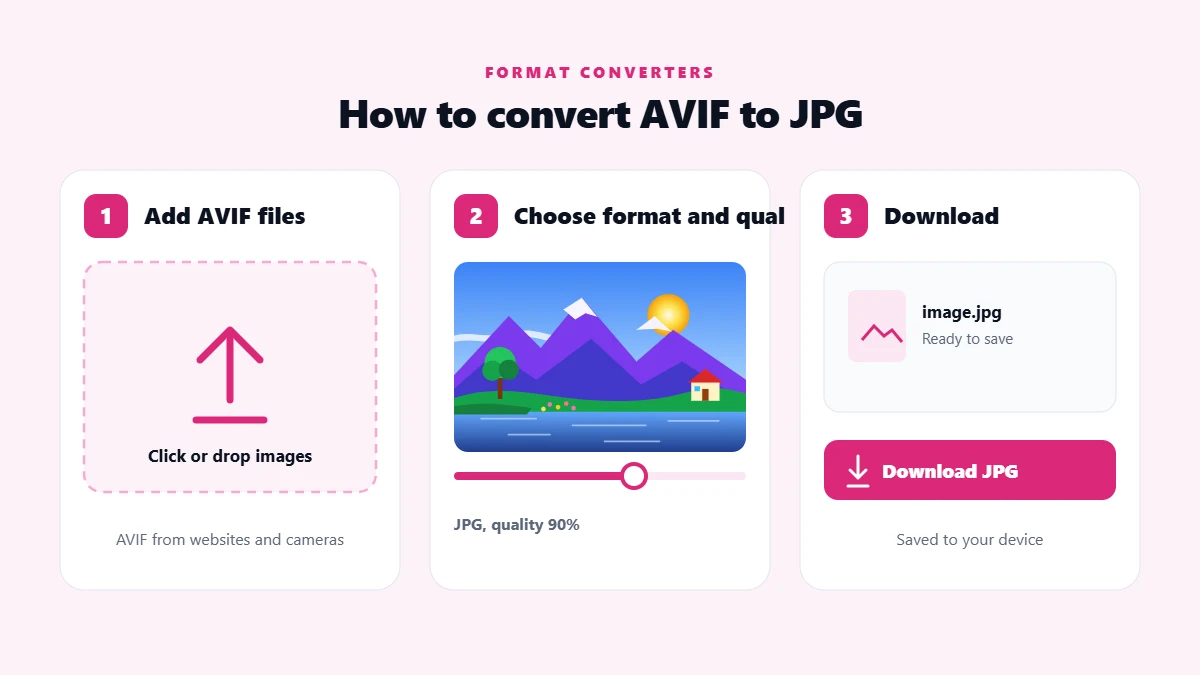
How to convert AVIF to JPG
AVIF (AV1 Image File Format) is a new, highly efficient image format used by many websites, CDNs and some cameras and phones. It is excellent for the web, but older software, editors and printers cannot open it yet.
Add AVIF files
Click the upload box or drop one or many .avif images.
Choose format and quality
JPG is the most compatible. PNG keeps transparency and is lossless.
Download
Press Download JPG or Download all as JPG (ZIP).
Watch: convert AVIF images to JPG
Popular reasons to convert AVIF to JPG
Editing apps
Many photo editors and older Photoshop versions cannot open AVIF files.
Upload forms
Most forms and portals only accept JPG or PNG.
Printing
Print services expect JPG or PNG files.
Sharing
Send images that open on every device and messaging app.
Office files
Insert images into Word, PowerPoint and Google Docs reliably.
Older Windows
Windows 10 needs an extra extension to preview AVIF files.
AVIF vs. WebP vs. JPG
| Format | Size at same quality | Compatibility |
|---|---|---|
| AVIF | Smallest (about 50% of JPG) | Modern browsers, limited apps |
| WebP | About 70% of JPG | Modern browsers and most apps |
| JPG | Baseline | Everything |
AVIF can store HDR and 10/12-bit color. When converting to 8-bit JPG, colors are mapped to standard sRGB.
Which browsers can open AVIF?
This converter uses your browser's built-in AVIF decoder, available in Chrome 85+, Edge 121+, Firefox 93+, Opera and Safari 16+ (iOS 16 and macOS Ventura or newer). If your browser is older, update it or use Chrome, and the conversion will work instantly with no extra downloads.
How to convert AVIF to JPG on Windows, Mac, iPhone and Android
No app to install. The tool works in any modern browser, so the steps are almost the same everywhere.
On Windows
- Open toolzzz.com/avif-to-jpg/ in Chrome, Edge or Firefox.
- Drag your AVIF files from File Explorer onto the upload box.
- Choose JPG or PNG and the quality, then press Download JPG.
- The new file is saved to your Downloads folder.
On Mac
- Open toolzzz.com/avif-to-jpg/ in Safari or Chrome.
- Drag the AVIF files from Finder or the Photos app onto the upload box.
- Choose JPG or PNG and the quality, then press Download JPG.
- Find the result in Downloads (Safari asks first if set to).
On iPhone and iPad
- Open toolzzz.com/avif-to-jpg/ in Safari.
- Tap the upload box and choose Photo Library, Take Photo or Choose File.
- Choose JPG or PNG and the quality, then tap Download JPG.
- Tap Download, then open it from the Files app and choose Save Image to add it to Photos.
On Android
- Open toolzzz.com/avif-to-jpg/ in Chrome.
- Tap the upload box and pick the AVIF files from your Gallery, Files or camera.
- Choose JPG or PNG and the quality, then tap Download JPG.
- The image appears in your Downloads folder and in Google Photos under Downloads.
Toolzzz vs. typical online converters
| Feature | Toolzzz AVIF to JPG | Typical online converters |
|---|---|---|
| Your files are uploaded to a server | Never. Converted in your browser | Usually |
| Output formats | JPG or PNG | Often JPG only |
| Batch conversion + ZIP | Unlimited | Often limited |
| Quality control | 10 to 100% | Rare |
| Resize while converting | Yes | Rare |
| File size limit | None | Often limited |
| Watermark or sign-up | None | Common |
"Typical" describes common limits of free online services. Plans and limits differ between sites.
A fast, private AVIF converter
Native decoding
Your browser decodes AVIF directly, so conversion is instant.
JPG or PNG
Small universal JPGs or lossless PNGs with transparency.
Batch + ZIP
Convert many AVIF images at once.
Optional resize
Limit width and height while converting.
Clean files
Metadata is not carried into the new file.
Private
Nothing is uploaded or stored.
Key terms explained
- AVIF
- AV1 Image File Format, a modern image format based on the AV1 video codec.
- HDR
- High dynamic range: images with a wider range of brightness than standard images.
- sRGB
- The standard color space used by most screens, web images and JPG files.
Frequently asked questions
How do I convert AVIF to JPG for free?
Drop the AVIF on this page and press Download JPG. No sign-up and no watermark.
Why can't I open AVIF files?
Many apps do not support AVIF yet. Converting to JPG or PNG makes the image open everywhere.
Does converting AVIF to JPG lose quality?
JPG is slightly lossy; at 90% the difference is not visible. Choose PNG for a lossless copy.
Will transparency be kept?
Choose PNG to keep transparency. JPG fills transparent areas with the background color.
Can I convert many AVIF files at once?
Yes. Add them all and press Download all as JPG (ZIP).
Which browsers are supported?
Chrome, Edge, Firefox, Opera and Safari 16 or newer.
Does it work on iPhone?
Yes, on iOS 16 or newer in Safari.
Are my files uploaded?
No. Everything happens in your browser.